Setting up Google Review Automation is the fastest way to get higher on Google search results and win more customers. Most local businesses struggle to get regular 5-star reviews because they ask for them by hand. Busy days mean employees forget to send review links, which leaves your Google Business Profile stuck while other businesses get ahead.
Using an automated system inside GoHighLevel (GHL) helps you save lost leads right away. It also builds a steady flow of customer reviews without extra daily work.
What is Google Review Automation?
Google Review Automation is an automated workflow setup built inside your CRM software (like GoHighLevel) that automatically requests and manages 5-star customer feedback. Instead of buying a standalone app or having your staff manually text review links at the end of a busy day, this system connects your sales triggers directly to your Google Business Profile. Once you set this up, the software detects when a service or project is marked complete and handles the entire review request sequence for you.
Why You Need GoHighLevel Google Review Automation & Lead Retention
Setting up an automated system solves two big problems where local businesses lose money every day. First, it catches people who call your business when nobody is available to answer. Second, it turns those saved calls and completed jobs into a steady stream of fresh online reviews.
Setting up an automated system solves two big problems where local businesses lose money every day. First, it catches people who call your business when nobody is available to answer. Second, it turns those saved calls and completed jobs into a steady stream of fresh online reviews.
| Growth Factor | Manual Process | Automated System |
|---|---|---|
| Response Speed | 2–4 Hours (Slow) | Under 60 Seconds (Instant) |
| Review Conversion Rate | 5% – 10% | 25% – 35% |
| Google Rank Impact | Slow | Fast and Steady |
Step 1: Set Up Missed Call Text Back (The Lead Safety Net)
Before asking customers for reviews, you need to make sure you capture every incoming phone call. GoHighLevel has a built-in feature that automatically texts people back as soon as you miss their call. This keeps the customer engaged so they do not hire a competitor instead.
Follow these simple steps inside your account to turn the feature on:
- Log in to your GoHighLevel account and click Settings → Phone Numbers.
- Scroll down to the Missed Call Text Back section.
- Click the box to turn the feature on.
- Type a short text message that sounds friendly and natural.
- Click Save Call Settings.
Sample SMS Template:
“Hi {{contact.first_name}}, sorry we missed your call! How can we help you out today? – {{location.name}}”
Prefer a Video Walkthrough?
If you’re a visual learner, watch our step-by-step video guide below! We walk through the exact GoHighLevel dashboard setup so you can follow along and launch your automation today.
Step 2: Connect Your Google Business Profile to GoHighLevel
To make your Review Automation work, you must link your official Google Business Profile directly to GoHighLevel. This integration lets the software send official review links and track when new reviews come in. It also lets the system post automated replies to your customers automatically.
Connecting your profile is quick and only takes a few steps:
- Go to Settings → Integrations.
- Click Sign in with Google and pick the account that owns your Google Business Profile.
- Choose your exact business location from the list.
- Click Reputation → Settings.
- Turn on review request permissions and paste your Google Review link.
Step 3: Build the Automated Google Review Workflow
Sending just one text message is rarely enough to get maximum results. Customers get busy, miss notifications, or simply forget to tap the link during a hectic day. Building a multi-stage automated workflow ensures that your business stays top-of-mind without becoming annoying. By sending an immediate, personalized text message first and following up with a polite email reminder a few days later, you create multiple gentle touchpoints. This double-channel approach significantly increases your total review conversion rates while keeping the entire process hands-free for your staff.
Setting up this sequence inside GoHighLevel gives you total control over timing, messaging, and conditions so that requests only go out to satisfied customers at the right moment.
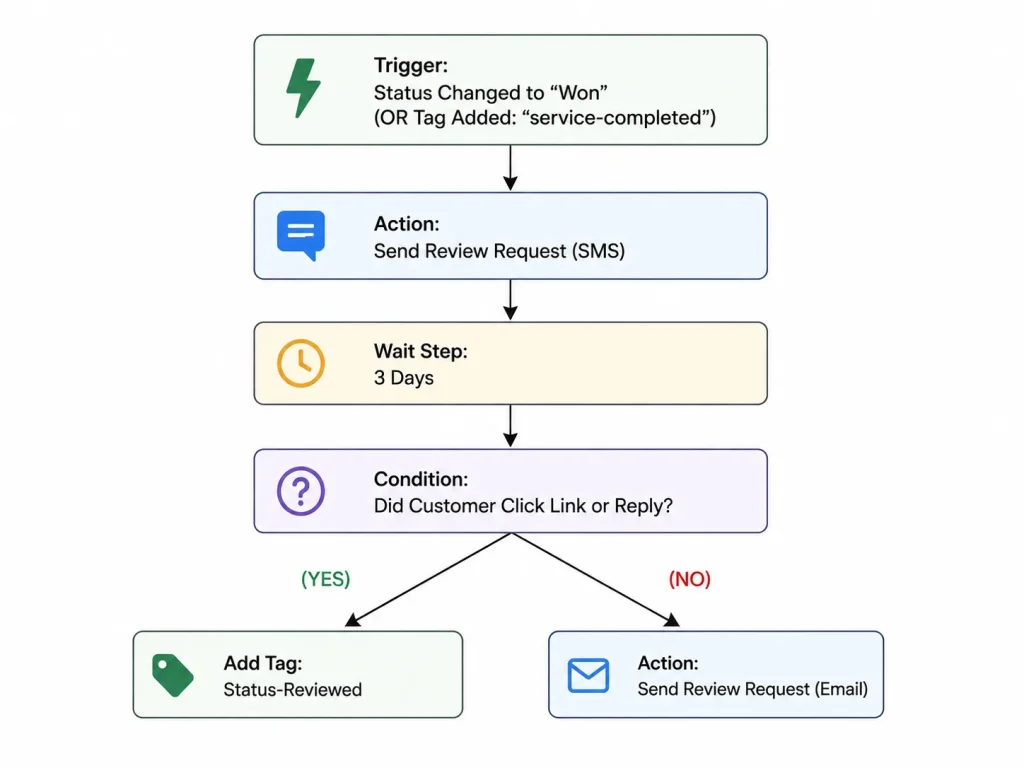
Here is the exact step-by-step process to build this automation from scratch inside your account:
- Click Automation → Workflows, then click Create Workflow and select Start from Scratch.
- Add a Workflow Trigger: Pick Opportunity Status Changed and set the condition to Status = Won or Stage = Job Completed.
- Add Action 1: Pick Send Review Request and select SMS.
- Add Action 2: Insert a Wait step set to 3 Days.
- Add Action 3: Add an If/Else step to check if the contact clicked the link or replied. If they did not reply, add an action to Send Review Request using Email.
- Turn the workflow on and click Save.
Step 4: Follow Google Rules & Turn On AI Replies
Google enforces strict guidelines regarding how local businesses request and handle customer feedback. Violating these policies can lead to severe penalties, including having your accumulated reviews deleted or your entire Google Business Profile suspended from local search maps. At the same time, maintaining an active profile by responding to every customer review shows Google’s algorithm that your business is legitimate and active, which directly boosts your local map pack rankings over time.
To protect your business while scaling your review count, keep these essential practices in mind:
- No Review Gating: Never ask customers if they had a good or bad experience before deciding whether to give them your Google link. Filtering customers so that only happy ones reach Google violates Google’s Terms of Service. Always send every customer to the same public review link.
- Turn On Reviews AI: Go to Reputation → Settings → Reviews AI. Turn on auto-replies so GoHighLevel automatically sends a personalized thank-you note for every 4-star and 5-star review you receive.
Ready to Put Your Google Review Automation on Autopilot?
Setting up GoHighLevel workflows, phone registrations and Google integrations requires technical focus to get right. A single wrong setting in a trigger or wait step can stop your review requests from sending out or cause compliance issues with Google.
If you want to launch a smooth system without spending hours fixing mistakes on your own, working with experienced professionals makes the process easy:
What we will build for you:
- Complete setup for SMS, email, and missed call text back sequences.
- Full sync with your Google profile along with automated AI review replies.
- Review setups built to follow Google rules and grow your 5-star reviews safely.
Stop losing customers to other local businesses and start getting more 5-star Google reviews today.