





When Your Workflows Outgrow Simple Triggers.
Zapier is excellent for simple A-to-B automations. But when your workflows need branching logic, data lookups, array iteration, or API calls mid-scenario, Zapier quickly becomes limiting or prohibitively expensive. That is where Make (formerly Integromat) becomes the right choice.
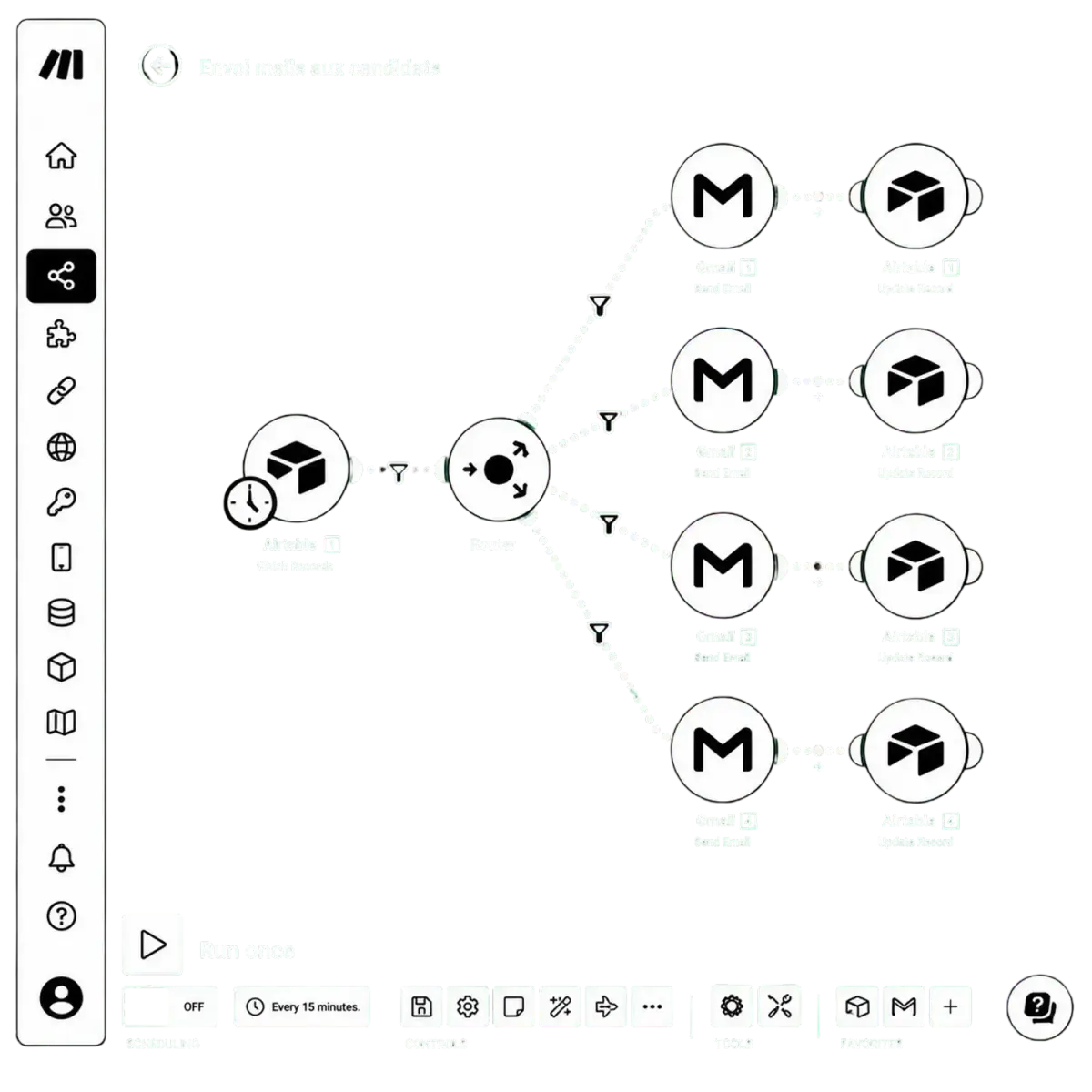
Make uses a visual canvas that shows the full flow of data through your scenario, every module, filter, router, and error handler visible at a glance. We build scenarios that handle real-world complexity without breaking when edge cases appear.
Map My Automation WorkflowsWhat we handle for you
Automation Without Limits, Built Visually.
Make is a visual automation platform that connects the apps your business already uses. Unlike simple trigger-based tools, Make handles branching paths, conditional routers, iterators, and aggregators that basic automation simply cannot.
Every scenario is built on a canvas that shows the full flow of data, every module, filter, router, and error handler visible at a glance. We design scenarios that handle real-world complexity without breaking when edge cases appear.
Because Make charges per operation rather than per Zap, it is often significantly cheaper at scale for high-volume or complex automation needs, making it the right choice once your workflows outgrow simple triggers.
Why Make Is the Right Choice for Advanced Automation.
Make gives you power, flexibility, and cost efficiency that simpler automation tools simply cannot match.
Complex logic support
Branching paths, conditional routers, iterators, and aggregators, Make handles multi-path scenarios that simple trigger-based tools simply cannot.
Data transformation
Parse, format, and transform data mid-workflow using built-in functions, map JSON, clean strings, calculate values on the fly.
Lower cost at scale
Make charges per operation rather than per Zap, making it significantly cheaper for high-volume or complex automation needs.
Full visual canvas control
Every module, filter, router, and error handler is visible on one canvas, the full flow of data through your scenario, at a glance.
Built-in error handling
Error handlers and alerts are built into every scenario so a failed step gets caught and flagged instead of silently breaking your workflow.
Scheduled and batch operations
Run large batch jobs on a schedule, nightly syncs, weekly reports, bulk updates, without anyone triggering them manually.
What Keeps a Make Scenario Running at Scale.
A scenario that works in a test run can still break under real volume. These are the engineering standards Isuremedia builds into every Make scenario so it keeps running as your data grows.
Operations-Efficient Design
Highest impactFilters placed early and modules kept lean, so every scenario uses as few operations as possible and your Make plan stays affordable.
Retry and Rate-Limit Strategy
High impactBreak and Resume directives, sleep steps, and retry rules that handle API rate limits and short outages without losing data.
Data Stores and State Tracking
High impactData stores used to track what has already been processed, preventing duplicate records and missed items between runs.
Modular Scenario Structure
High impactLarge workflows split into smaller linked scenarios, so each part is easier to test, fix, and change without touching everything else.
Incomplete Execution Recovery
Medium impactIncomplete executions stored and resumable, so a failed run can be fixed and replayed instead of re-entering data by hand.
Secure Connection Ownership
Medium impactConnections, API keys, and webhooks owned by company accounts with the right access, not tied to one person's login.
Blueprint Backups
ContextualScenario blueprints exported and versioned before major changes, so any scenario can be rolled back in minutes if something goes wrong.
Naming and Module Notes
Growing fastClear scenario names, folders, and notes on key modules, so anyone opening the scenario understands what each step does.
Our Make Automation Services
Everything It Takes to Run Complex Workflows Reliably.
Scenario Mapping and Architecture
Every data source, transformation step, and output destination documented before we build a single module.
Complex Scenario Builds
Branching logic, routers, iterators, and aggregators built to handle real-world complexity without breaking.
Error Handling and Alerts
Error handlers on every scenario so failures are caught and flagged instead of failing silently.
Data Transformation Setup
Parsing, formatting, and calculation logic that turns messy source data into clean, usable output.
Scheduling Configuration
Recurring jobs, nightly syncs, and batch operations scheduled to run automatically at the right cadence.
Testing and QA
Every scenario tested with real data before going live, including the edge cases that break automations.
Full Documentation
Clear documentation so your team can understand, maintain, and extend the automation without starting over.
Monitoring Setup
Ongoing monitoring so you know the moment a scenario stops running as expected.
Who Make Automation Is Built For
If Your Workflows Have Outgrown Simple Triggers, This Is for You.






Why Businesses Choose Isuremedia for Make Automation
Complex Logic, Handled Properly, Documented Fully.
We map before we build
Every data source, transformation step, and output destination is documented before a single module goes live, so nothing gets discovered mid-build.
We handle complex logic other agencies avoid
Branching paths, iterators, aggregators, and conditional routing are our default, not an upsell, this is what Make is built for.
We build in the platform that fits your budget
Make, Zapier, or n8n, we recommend the platform that fits your complexity and volume, not the one that is easiest for us to sell.

Full documentation and handover
Every scenario is documented clearly so your team understands exactly how it works, not left guessing when something needs to change.
Monitoring and alerts included
We set up monitoring so failures get flagged immediately, not discovered weeks later when the data has already gone stale.
Month to month, no lock-in
We do not tie you into long contracts. You stay because your automations are running reliably, not because you signed something months ago.
Map to Monitored Scenarios in Five Steps
We plan before we build, test before we launch, and document everything for your team.
We document every data source, transformation step, and output destination before building a single module.
Scenario architecture designed with error handling, data filters, and conditional paths mapped out clearly.
All scenarios built in Make with testing data, error alerts, and scheduling configured from the start.
A full QA pass on every scenario path, including the edge cases that break unmonitored automations.
Monitoring alerts configured and full documentation delivered so your team can maintain the scenarios going forward.
Questions About Make Automation
Straight answers to the questions we hear most. No spin, no buzzwords.
Get Started →Ready for Automations Built With Precision?
Simple automations tend to break down the moment your process gets complicated. Make handles the branching logic, multi-step workflows, and edge cases that simpler tools can't touch. Talk to us today and we will show you how to automate your most complex workflows.